

Recognize what’s there.
Computer, camera, printer, router and storage icons make the list easier to read. Identification uses the services a device actually exposes; uncertain results stay labeled as uncertain.
WINDOWS NETWORK DISCOVERY · VERSION 0.1.4
The workstation. The printer. The camera by the door. Find responding devices, see their open ports and turn a list of IP addresses into a useful picture.
Completely free. No subscription or payment.
Verified sign-in and ADL promotional-email agreement required.
Windows 10 & 11 · 64-bit
FROM ADDRESSES TO ANSWERS
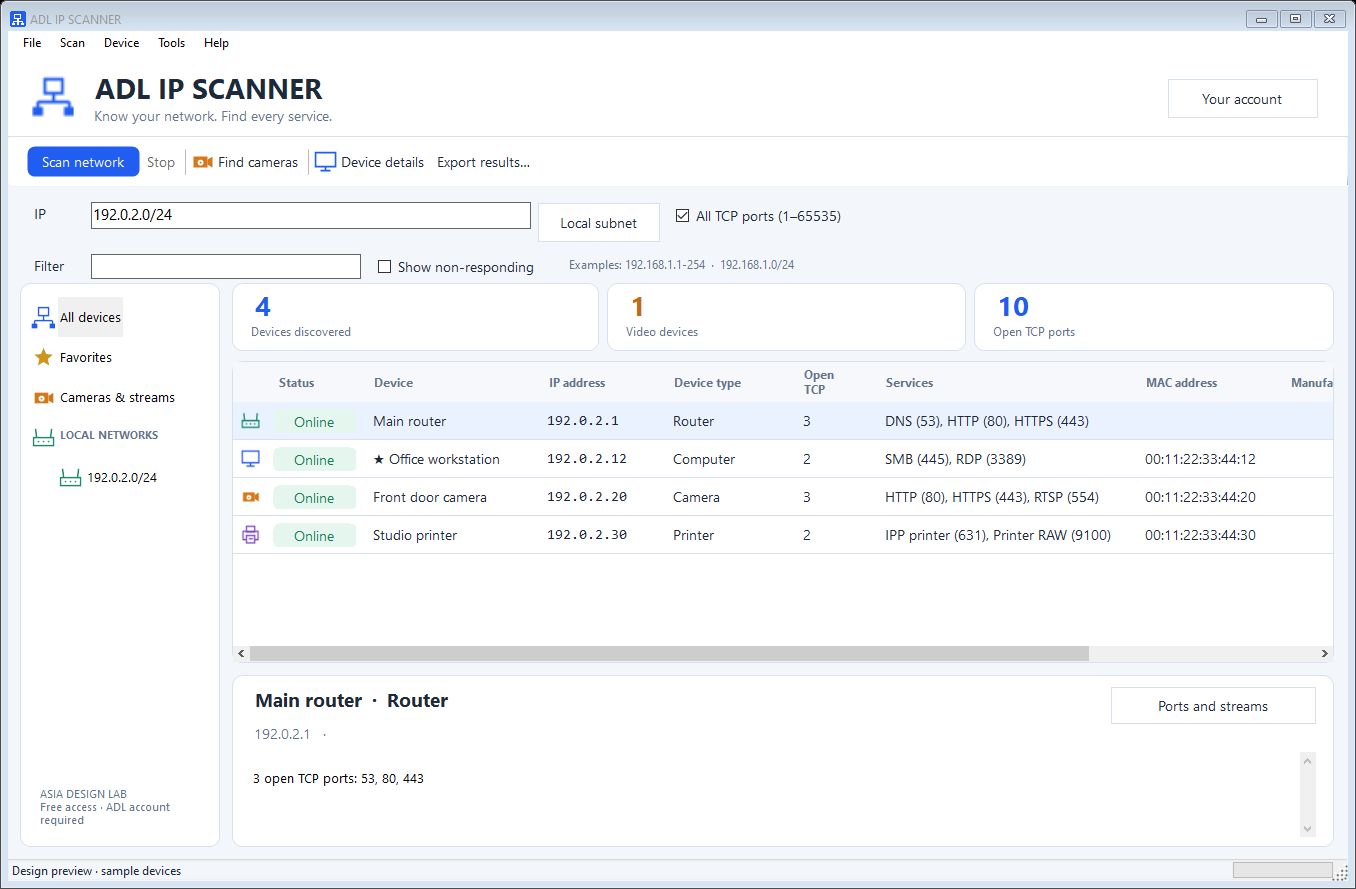
Start with a local subnet or enter an IPv4 range. Devices appear as they respond, with names, useful icons, service details and room for your own notes.
Computer, camera, printer, router and storage icons make the list easier to read. Identification uses the services a device actually exposes; uncertain results stay labeled as uncertain.
1—65535
Scan the full TCP port range on responding devices, or check one device in more detail. See successful connections and named services, from HTTPS to SMB and Remote Desktop.
A timeout is a non-response, not proof that a port is closed.Find. Save. Share.
Favorite important devices, add comments and filter by name, address, type, service or port. Export the inventory as CSV, HTML or JSON when it is time to document the network.
BUILT FOR CAMERA DISCOVERY, TOO
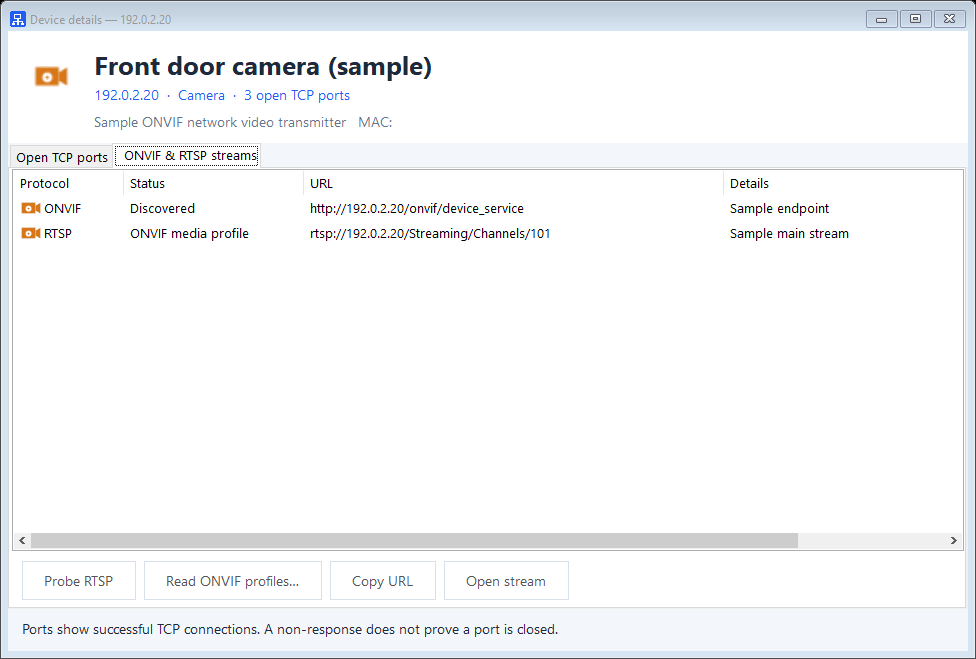
A dedicated camera scan brings ONVIF discovery and RTSP service checks into the same workspace.
Open a discovered RTSP URL in your installed player. Camera credentials are used for the request and are not saved.
DISCOVERY THAT FITS YOUR WORKFLOW
Useful network tools are close at hand, with your inventory staying in one place.
Launch Remote Desktop, SSH, Windows shares, ping or trace route from the selected device. Wake-on-LAN is available for compatible equipment.
Keep favorites and comments across app restarts and updates. Export a report, or bring a saved JSON inventory back into the scanner.
Launch your installed ADL Remote Admin Viewer and copy the selected IP for your next step. Remote Admin keeps its own account, approvals and subscription.
Explore ADL Remote AdminFREE ACCESS. A CLEAR START.
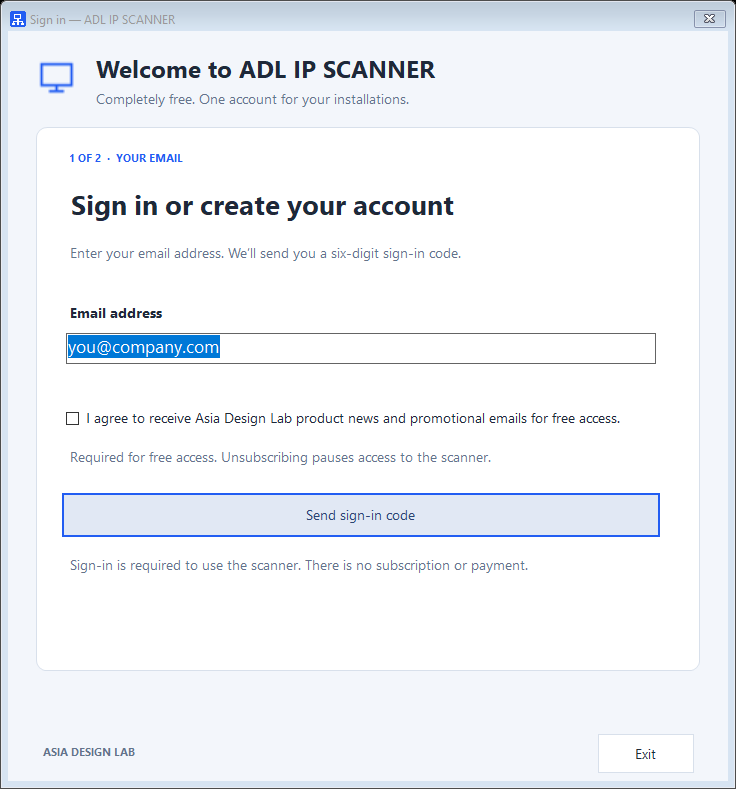
No password to create and no payment to enter. Verify your email and agree to ADL product news and promotional emails to unlock the free scanner.
Download the signed installer. Setup adds the scanner and its automatic update service.
Accept the required promotional-email agreement, then enter the six-digit code from your inbox. An existing signed-in user accepts the agreement once.
Select a local subnet or enter a range. Start a network scan, or choose Find cameras for ONVIF and RTSP discovery.
NO SUBSCRIPTION. NO PAYMENT.
Free access requires a verified ADL account and agreement to receive Asia Design Lab product news and promotional emails. Scanning stays locked until sign-in and agreement are complete.
You can unsubscribe at any time. Doing so pauses scanner access until you opt in again. Your account and saved scan results are kept.
Your network results stay local.
Account registration sends your email, installation ID, computer name and app/OS versions. Your scan results, MAC inventory and camera credentials are not uploaded.
ADL IP SCANNER 0.1.4
Native Windows discovery. Completely free.
Verified sign-in and promotional-email agreement required.
No subscription or payment. Unsubscribing pauses access.
Internet access is required for sign-in and access checks. Setup may ask for Windows administrator approval.
Published by Asia Design Lab.
Windows signing publisher: Euronet Imports SL.
Version 0.1.4 · Windows x64 · 76894208 bytes
SHA-256 25692e14f6f72b8366fef094bda22e6ef439046418d8a105af8c4868fd56142e
BEFORE YOU SCAN
Yes. There is no subscription or payment. A verified ADL account and agreement to ADL promotional emails are required before you can use the scanner. You can unsubscribe at any time; scanner access then pauses until you opt in again.
The All TCP ports option checks ports 1–65535 on responding devices. You can also scan all TCP ports on a selected device. Successful connections are shown as open. A firewall or timeout can hide a device or port, so a non-response does not establish that it is closed. General UDP port scanning is not included; ONVIF discovery uses UDP 3702.
The scanner combines responding services and available network information. ONVIF discovery provides evidence of a camera. A listening RTSP port alone is shown as a media device, while a video SDP response confirms a video stream. Some categories are service-based hints; unfamiliar devices remain unknown. You can import an IEEE OUI CSV for manufacturer lookup.
ONVIF multicast discovery normally stays within the local subnet. The app supports ONVIF Media1 profiles and checks common RTSP ports and paths. Some cameras require credentials; enter them when reading profiles. Media2-only devices and every vendor-specific stream path are not covered. Playback uses an installed RTSP player.
No. Device inventories, MAC addresses, notes and camera credentials stay on your PC. Account registration and access checks use your email, installation ID, computer name and app/OS version. Saved sign-in tokens are protected by Windows.
The MSI installs a Windows update service. It checks for new releases, verifies their signatures and downloads the installer. The app shows a notice before closing for an update. Settings, favorites, comments and installation identity are kept. Internet access is needed to receive updates.
Published by Asia Design Lab. Screenshots are rendered using the actual native Windows app controls with demonstration devices, endpoints and email addresses. No customer network or account data is shown. Scan only networks you own or are authorized to administer.